1. Workflow Engine Architecture Overview
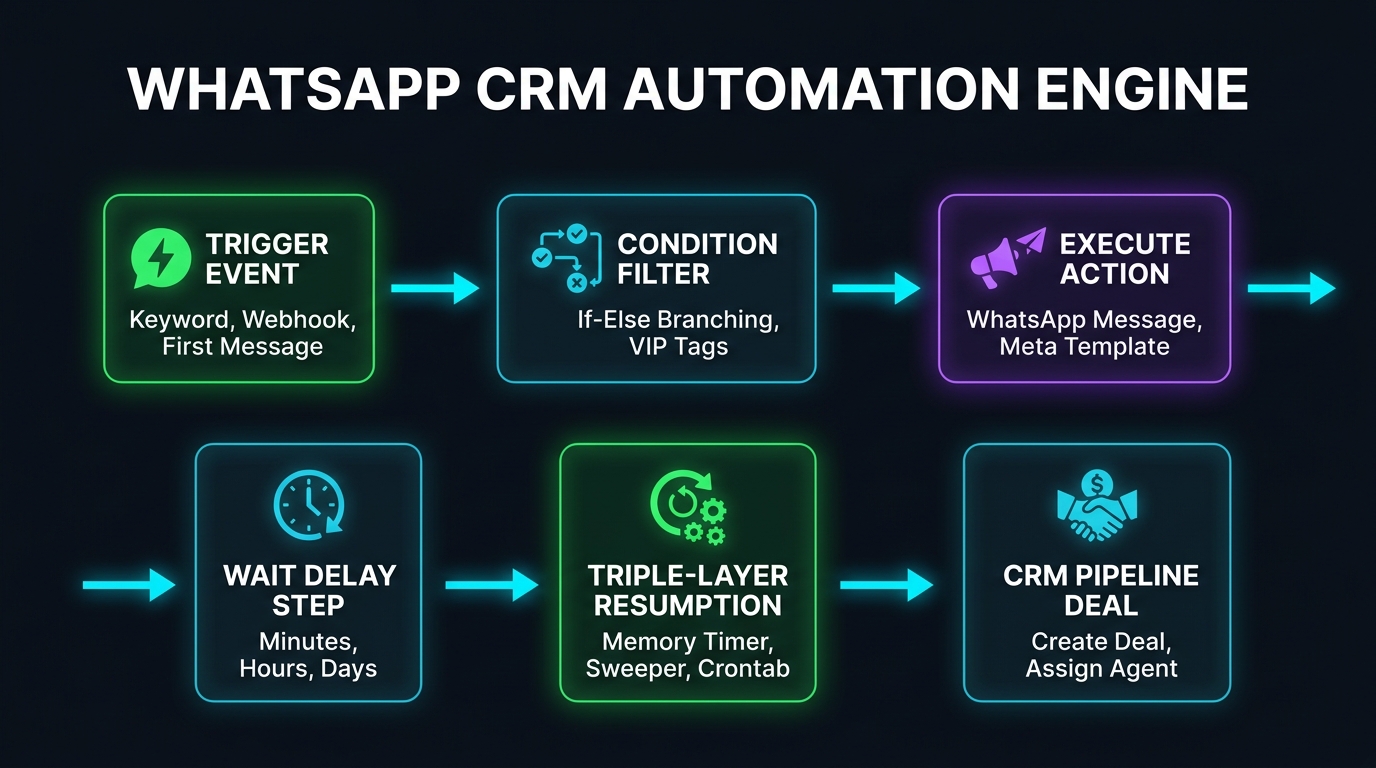
The Ai Botflow Automation Engine is an event-driven workflow orchestrator specifically architected for Meta's WhatsApp Cloud API and omnichannel pipelines.
Unlike rigid, linear auto-responders, the engine operates on a state-machine execution model:
- Inbound Event Capture: An incoming message, webhook payload, or contact tag change triggers engine evaluation.
- Pessimistic Execution Logging: Before executing any action, the engine creates an execution log row in the database with status
runningto guarantee auditability and idempotency. - Sequential Step Loop: Steps execute in order. When branching conditions (If / Else) are evaluated, the execution pointer follows either the YES or NO branch.
- State Suspension on Delays: When a
waitstep is encountered, the execution state, current variable map, and target resumption timestamp (run_at) are committed to theautomation_pending_executionstable.
2. Deep Dive: The 9 Supported Triggers
A trigger is the starting catalyst that launches a workflow. Ai Botflow supports 9 native triggers:
| Trigger ID | Display Name | Activation Condition | Required Configuration |
|---|---|---|---|
| keyword_match | Keyword Match | Customer sends a specific keyword like "PRICE", "DEMO", "OFFER". | Keywords array, Match Type (contains, exact, word), Case Sensitivity. |
| first_inbound_message | First Inbound Message | Fires once when an unknown phone number sends their first message. Ideal for Welcome Drips. | None (Automatic detection). |
| new_message_received | New Message Received | Fires on every inbound customer message across the workspace. | None. |
| interactive_reply | Interactive Reply | Customer taps a Quick Reply button or selects an item from a list menu. | Target Button ID or List Row ID array. |
| tag_added | Tag Added to Contact | When a contact receives a specific tag manually or via CRM pipeline. | Target Tag ID. |
| new_contact_created | New Contact Created | Triggered when a contact is created via CSV import or API integration. | None. |
| incoming_webhook | Incoming Webhook | Instant trigger from Shopify, Facebook Lead Ads, WooCommerce, or Zapier. | JSON Phone Path (e.g. payload.customer.phone). |
| conversation_assigned | Conversation Assigned | Fires when a chat is routed to a specific agent or team queue. | None. |
| time_based | Scheduled Trigger | Executes on a recurring cron schedule or designated calendar date. | Standard 5-field cron expression or ISO date. |
3. Deep Dive: The 12 Action Nodes
Once triggered, the engine executes customized steps:
send_message(Plain Text): Instant WhatsApp text with dynamic templating tags (e.g.,Namaste {{name}}).send_buttons(Interactive Quick Replies): Sends up to 3 clickable buttons per Meta policy for friction-free responses.send_list(Interactive Menu): Sends an interactive menu card with organized sections and up to 10 selectable items.send_template(Meta-Approved Cloud API Template): The 24-Hour Window Bypass. After 24 hours of customer inactivity, only approved templates can be delivered. Supports image/PDF headers and positional params{{1}},{{2}}.wait(Resilient Delay): Suspends workflow execution for specified minutes, hours, or days. Resumed by the Triple-Layer Engine.condition(If / Else Decision Node): Branches workflow based on Contact Tags (e.g., has tag "VIP"?), Contact Field values (e.g., city == "Mumbai"), or message regex.add_tag&remove_tag: Dynamic customer segmentation. Protected with 5-level infinite loop recursion limits.create_deal(CRM Pipeline Integration): Automatically inserts a deal into a designated Kanban stage, auto-merging with active deals if already present.assign_conversation: Assigns conversation to a specific sales rep or distributes evenly via Round-Robin across the sales team.update_contact_field: Modifies standard attributes (name, email, company) or workspace Custom Attributes.send_webhook: Dispatches real-time HTTP POST JSON to third-party endpoints (Zapier, Make, custom ERP) with strict SSRF private-IP blocking.close_conversation: Marks the WhatsApp thread as resolved in the Shared Inbox once the workflow reaches its conclusion.
4. How the Triple-Layer Wait Resumption Works
The true test of an enterprise automation engine is how it handles delays. In basic CRMs, if an application restarts during a 3-day drip wait, the process dies.
Ai Botflow implements a Triple-Layer Resumption Architecture:
The 3 Redundancy Tiers:
- Tier 1 — In-Memory High Precision (≤ 15 Minutes): For short waits, Node.js runtime creates a lightweight memory timer (
scheduleWaitWakeup) to fire the resumption callback with sub-second accuracy. - Tier 2 — Background Database Sweeper (Every 30s): Next.js continuous background worker scans
automation_pending_executionsevery 30 seconds for due timestamps. - Tier 3 — Operating System Host Crontab (Every 1m): A server-level crontab (
* * * * * curl -s http://localhost:3000/api/automations/cron) guarantees that even if Docker containers reboot or workers recycle, the queue resumes instantly. - Atomic Race-Condition Lock: To prevent sending duplicate WhatsApp messages across clustered servers, workers atomically update
status = 'running'before dispatching.
5. Dynamic Variables & Templating Syntax
You can personalize WhatsApp messages and webhook payloads dynamically:
| Variable Tag | Source Field | Sample Output |
|---|---|---|
| {{name}} | Contact Display Name | "Vikram Malhotra" |
| {{phone}} | Contact WhatsApp Phone Number | "+919876543210" |
| {{message.text}} | Inbound Customer Message Body | "I want pricing for 5 users" |
| {{vars.field_name}} | Custom Webhook Payload Attribute | {{vars.order_id}} → "#40921" |
6. Three Real-World Automation Recipes
Recipe A: Welcome Flow + 2-Hour Drip
- Trigger:
first_inbound_message - Step 1:
send_message→ "Namaste {{name}}! Welcome to Ai Botflow. How can our team help you today?" - Step 2:
add_tag→ Tag:New Inbound Lead - Step 3:
create_deal→ Stage:Discovery Stage - Step 4:
wait→2 hours - Step 5:
send_message→ "Hi {{name}}, just following up! Did you have a chance to check out our demo video?"
Recipe B: Interactive Keyword Menu with Quick Reply Buttons
- Trigger:
keyword_match(Keywords: "PRICE", "MENU", "SERVICES", Match:contains) - Step 1:
send_buttonswith Header: "Ai Botflow Solutions" and Buttons:btn_pricing: 💰 Pricing Plansbtn_demo: 🎥 Book Live Demobtn_support: 📞 Call Support
Recipe C: Facebook Ads / Website Lead to CRM Pipeline
- Trigger:
incoming_webhook(Mapped from Facebook Instant Forms or Shopify) - Step 1:
send_template→ Dispatches pre-approved welcome WhatsApp template immediately. - Step 2:
add_tag→ Tag:Paid Social Lead - Step 3:
create_deal→ Deal Title:{{name}} - {{vars.service}} - Step 4:
assign_conversation→ Mode:Round-Robinacross active sales reps.
7. Monitoring, Execution Logs & Meta 24h Policy
A mission-critical aspect of production automation is continuous observability:
- Granular Logs: Navigate to /automations/[id]/logs to inspect each execution. Statuses include: 🟢 Success (Delivered), 🟡 Partial (Sleeping in wait step), and 🔴 Failed (Meta error code or invalid number).
- 24-Hour Policy Compliance: Meta enforces a 24-hour customer service window. Plain text messages sent after 24 hours of inactivity fail with error code
#131047. Always use approved templates (send_template) for delays exceeding 24 hours. - Infinite Loop Protection: Tag-triggered automations are enforced with a strict 5-level execution depth limit to prevent infinite cascading loops.
8. Frequently Asked Questions
Can I send WhatsApp messages to leads from Google Sheets or Shopify?
Yes. Simply copy your unique incoming webhook ingestion URL from Ai Botflow and paste it into Shopify, Zapier, or Google Apps Script. Leads immediately trigger personalized WhatsApp flows.
What happens if my server restarts while a 3-day wait step is running?
Nothing is lost. The wait state is persisted in automation_pending_executions. When the server reboots, the Tier 3 host crontab automatically resumes the step at the exact scheduled timestamp.
Can I route leads equally across multiple sales team members?
Yes. The assign_conversation action includes native Round-Robin routing, distributing leads evenly among all active agents.