
1. The Chrome Extension Trap: Why Unofficial Senders Get Banned
Most small businesses start their WhatsApp marketing journey with a ₹999/month Chrome extension or desktop automation tool that requires scanning a QR code from WhatsApp Web.
Here is what happens behind the scenes:
- Reverse-Engineered WebSocket Abuse: Unofficial tools spoof an active browser session. Meta's anti-abuse machine learning models monitor keystroke timings, socket ping frequencies, and delivery bursts.
- Automated Honey-Pot Detection: When an unofficial tool blasts 500 messages in 10 minutes from a residential IP address, Meta's automated fraud detection flags the account immediately.
- Permanent Hardware Ban: Once banned, Meta blocks the phone number, the IMEI fingerprint, and often the SIM card's registered payment profile, causing irreversible loss of your primary brand phone number.
2. Understanding Meta's Phone Number Quality Rating
Inside your Meta WhatsApp Manager and Ai Botflow dashboard, your phone number has an active Quality Rating based on recent customer feedback over a rolling 7-day window:
- GREEN (High Quality): Less than 0.5% of recipients block or report your messages. Full messaging limits and fastest delivery speeds are granted.
- YELLOW (Medium Quality): Increased block reports. Meta issues an automated warning. Your messaging tier is paused from automatic increases.
- RED (Low Quality): High rate of negative user actions. If your number remains in RED for 7 consecutive days, Meta automatically downgrades your messaging tier (e.g. from 10k down to 1k/day).
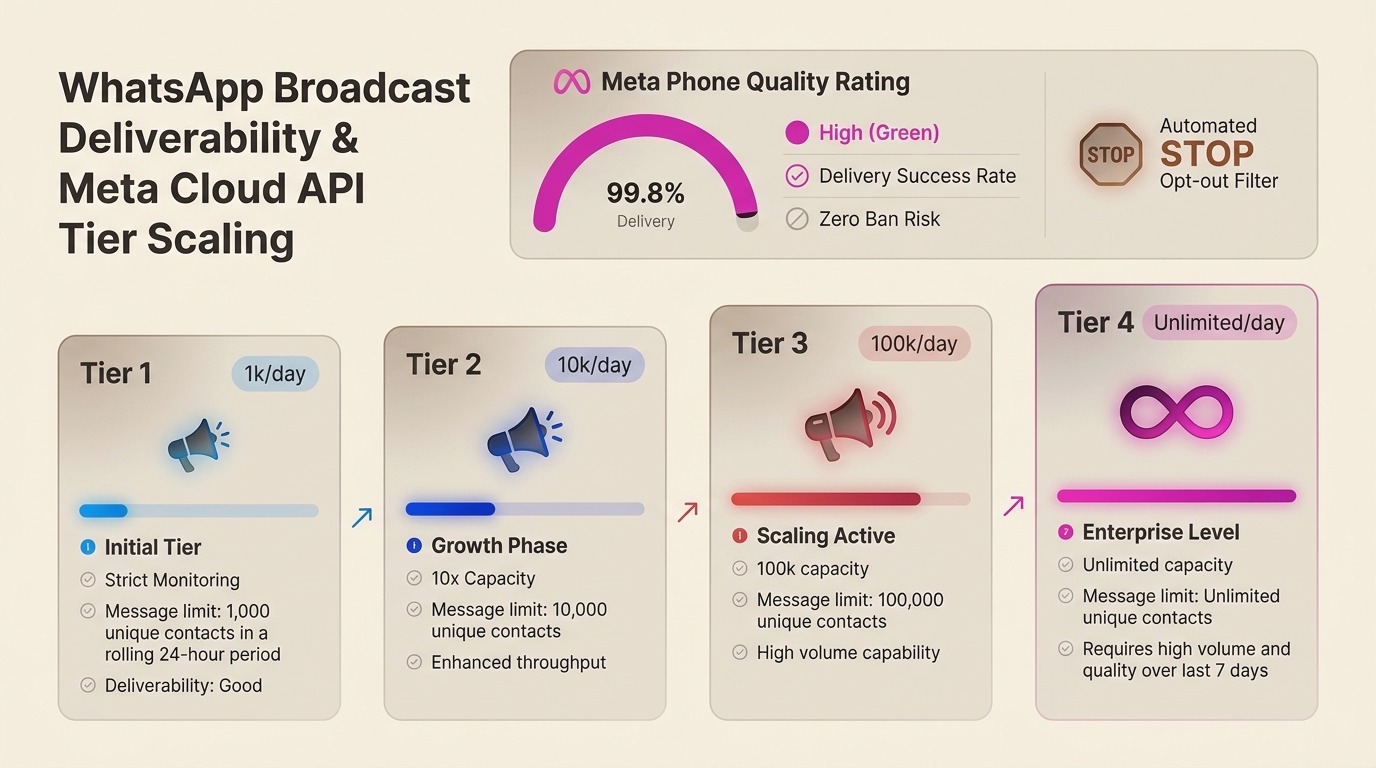
3. Meta Messaging Tiers Explained
Unlike email where you can send 1,000,000 emails on day 1 (and land in spam), Meta implements a strictly enforced tier-based progression to protect WhatsApp users:
| Tier Level | Daily Limit | Unique Business-Initiated Contacts | Requirement to Upgrade |
|---|---|---|---|
| Tier 1 (Default) | 1,000 / 24h | 1,000 unique recipients | Verified Meta Business Manager |
| Tier 2 | 10,000 / 24h | 10,000 unique recipients | Send 500+ messages in Tier 1 with Green Quality |
| Tier 3 | 100,000 / 24h | 100,000 unique recipients | Send 5,000+ messages in Tier 2 with Green Quality |
| Tier 4 (Enterprise) | Unlimited / 24h | Uncapped broadcast volume | Send 50,000+ messages in Tier 3 with Green Quality |
4. The 48-Hour Fast-Track Tier Upgrade Strategy
You do not need to wait months to reach Tier 3 (100k messages). Meta’s algorithm automatically triggers a tier upgrade if you follow this exact blueprint:
- Day 1 (Warmup): Take your highest-intent, most active customers (e.g. VIP buyers who purchased in the last 14 days). Send 550 personalized utility/update messages. Keep your Quality Score at 'GREEN'.
- Within 24 Hours: Because you utilized >50% of your current tier (550 of 1,000) with High Quality, Meta’s system automatically promotes your account to Tier 2 (10,000/day).
- Day 2: Broadcast to 5,500 active contacts using an engaging template with interactive Quick Reply buttons. Maintain a low block rate.
- Within 48 Hours: Meta upgrades your capacity to Tier 3 (100,000/day).
5. Automated Opt-Out (STOP) Compliance Architecture
Under Meta’s 2026 Commercial Policies and India’s DPDP (Digital Personal Data Protection) act, every promotional broadcast must offer recipients an instant opt-out mechanism.
In Ai Botflow, when a customer taps the "Unsubscribe" or "STOP" button on your broadcast message:
- Our webhook instantly captures the
button_replyevent. - The contact’s custom attribute is automatically updated to
optout: true. - The contact is added to a global exclusion list, preventing any future promotional campaign from dispatching to that phone number.
- A polite confirmation is returned: "You have been unsubscribed from promotional updates. Reply START anytime to re-enable."
6. High-Converting, Low-Spam Message Templates
Templates that sound like pushy telemarketing trigger instant user blocks. High-performing brands frame broadcasts around value, exclusivity, and interactive choices. Here are two verified examples:
7. Frequently Asked Questions
Can I import an Excel sheet with 50,000 numbers into Ai Botflow?
Yes. Ai Botflow allows CSV and XLSX imports with up to 50 custom contact variables (`{{name}}`, `{{city}}`, `{{order_id}}`, etc.). Messages are dispatched via Meta Cloud API batching with real-time delivery graphs.
What is the dispatch speed for 100,000 broadcasts?
Ai Botflow processes broadcast queues at speeds of up to 1,000 messages per second via Meta’s enterprise throughput pipeline, ensuring entire campaigns are delivered within minutes.