
1. What is the WhatsApp Green Tick (Official Business Account)?
When a standard business sends a WhatsApp message, the customer sees an unknown raw phone number (e.g., +91 98765 43210) accompanied by a cautionary prompt from WhatsApp asking if the sender is spam.
With an Official Business Account (OBA):
- Display Name Visibility: Your company name appears in bold header text instead of the phone number.
- Green Verification Badge: A verified green checkmark icon is displayed next to your business name.
- Zero Spam Warnings: Customers never see the intimidating "Block / Report Spam" prompt on the first interaction.
- Trust & Click-Through Rates: Conversion rates on transactional notifications and broadcast updates increase by an average of 28% to 44%.
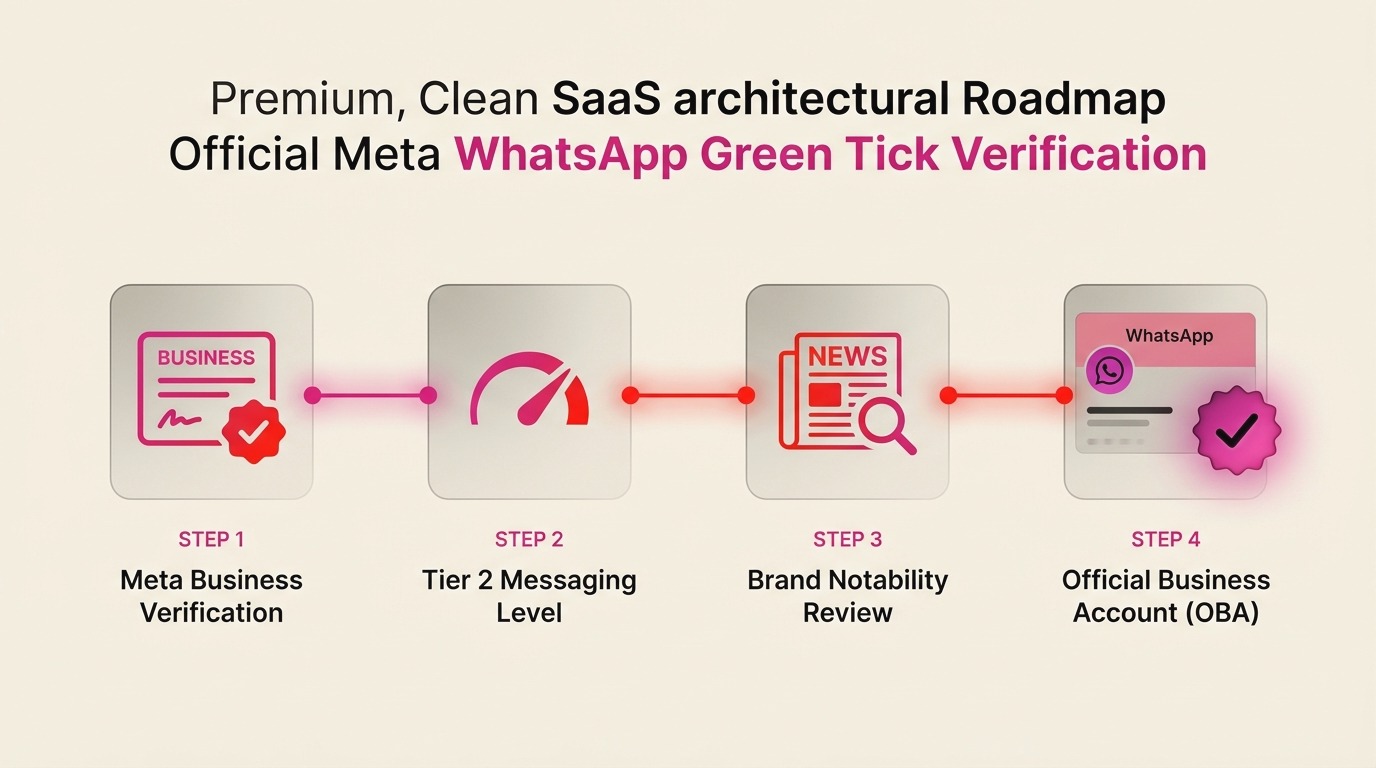
2. Core Eligibility Criteria Meta Evaluates
Meta uses automated scanning combined with human review teams in Hyderabad and Dublin to evaluate every application. To be approved, your business must satisfy four strict prerequisites:
-
Meta Business Manager Verification: Your Meta Business Account (BM) must have completed Legal Entity Verification. The status inside
Security Centermust show a green "Verified" checkmark. - Meta Cloud API Tier 2+ Standing: Your phone number must be running on the official Meta Cloud API (not an unofficial QR scraper) and must be communicating on at least Tier 2 messaging capacity (10,000 unique conversations/day).
- Brand Notability & Press Presence: Meta evaluates whether your brand has organic coverage in legitimate news media publications (Times of India, YourStory, Inc42, Economic Times, Livemint, etc.). Paid PR releases on news wire sites are explicitly filtered out.
- Two-Factor Authentication (2FA): 2-step verification must be actively enforced across all Meta Business Manager admins and on the WhatsApp phone number itself.
3. Required Indian Business Documents Checklist
For businesses registered in India, document mismatch between your legal registration and your official website domain is the #1 cause of rejection. Ensure you have the following PDF documents ready:
Mandatory Document Checklist (India)
- GST Certificate (REG-06): All 3 pages showing the exact legal entity name and operating address.
- Certificate of Incorporation (MCA): For Private Limited or LLP companies. (For Proprietorships: MSME / Udyam Registration certificate).
- Latest Utility Bill: Electricity, landline telephone, or GST bank statement issued within the last 90 days matching the registered address verbatim.
- Official Corporate Email: Must use a custom domain (e.g.,
founder@yourbrand.com). Free domains like Gmail, Yahoo, or Outlook are auto-rejected by Meta. - Active SSL Website: Must include a working Contact Us page with the exact company legal name, address, and GSTIN in the footer.
4. Step-by-Step Application Submission via Meta Cloud API
Once your Meta Business Manager is verified, follow this exact sequence to apply for OBA status:
- Log into Meta Business Suite and navigate to WhatsApp Accounts.
- Select your active WhatsApp Business Account (WABA) and click WhatsApp Manager.
- Under Account Tools in the left sidebar, click Phone Numbers.
- Click the Settings (Gear Icon) next to the phone number you wish to verify.
- Under the Profile tab, scroll down to Official Business Account and click Submit Request.
- Provide 3 to 5 non-promotional news articles from accredited national media outlets that demonstrate brand notability.
- Review your submitted display name. Ensure it matches your registered trademark or website header exactly.
- Click Submit. Meta's review turnaround time typically ranges from 48 hours to 5 business days.
5. Top 5 Rejection Traps (and How to Overcome Them)
- Trap 1: Display Name Mismatch: If your GST says "ABC Retail Solutions Pvt Ltd" but your requested display name is "SuperDeals India", Meta will reject it unless your website clearly showcases both or you provide a registered Trademark certificate (TM-A).
- Trap 2: Paid PR Submissions: Links from sites like ANI Press Releases, PR Newswire, or sponsored posts containing "disclaimer: this is sponsored content" are detected by Meta's NLP filter and disregarded.
- Trap 3: Insufficient Messaging History: Applying on a brand-new number with less than 1,000 sent messages will fail. Build at least 14 days of clean transactional messaging with a "HIGH" phone quality score before applying.
- Trap 4: Missing Website Legal Footers: If your website footer does not display your Privacy Policy, Terms of Service, and Refund Policy, Meta flags the domain as high-risk.
- Trap 5: Operating in Prohibited Verticals: Crypto, payday loans, gambling, adult products, and unlicensed pharmaceutical sales are strictly prohibited under Meta's WhatsApp Commerce Policy.
6. Proven Meta Appeal Email & Ticket Script
If your legitimate business was rejected due to an automated false positive, submit a Direct Support Ticket inside Meta Business Manager using this verified appeal template:
7. Frequently Asked Questions (FAQ)
Does Meta charge a fee for the Green Tick?
No. Meta does not charge any fee for Green Tick verification. Beware of unofficial agencies charging ₹20,000 - ₹50,000 claiming they can "guarantee" a badge. Verification is decided solely by Meta's compliance algorithm.
Can I get banned after receiving the Green Tick?
Yes. If your phone number's quality score drops to 'RED' due to excessive customer blocks or spam reports, Meta will revoke your Green Tick and may restrict your messaging tier.
How does Ai Botflow help?
Ai Botflow provides direct Meta Cloud API onboarding, display name pre-validation, document compliance checks, and guided submission assistance to ensure your application passes on the first review.